
Download 8 Zip – Free, Secure & Fast ZIP File Decompression Tool for Windows, Mac, Android & iOS
Looking for a reliable, fast, and secure way to decompress ZIP files across all your devices? 8 Zip is a powerful software application designed to handle ZIP, RAR, 7Z, CBR, DOC, and other archive formats with ease. Whether you're managing large project files, downloading software packages, or organizing digital media, 8 Zip offers a seamless experience on Windows, Mac, Android, and iOS.
With over three million downloads and continuous updates, this cross-platform tool has earned its reputation as one of the most trusted file compression utilities. Its intuitive interface, multilingual support, and advanced encryption features make it ideal for both casual users and professionals. Best of all, the free version provides full access to essential features, while premium upgrades unlock even more functionality.
Download 8 Zip today and simplify your file management workflow.
Key Features of 8 Zip – Why It Stands Out
When it comes to managing compressed files, 8 Zip delivers a comprehensive suite of tools that go beyond basic extraction. One of its standout features is its support for over 25 archive formats, including ZIP, RAR, 7Z, CBR, ISO, TAR, GZ, and even Microsoft Office documents like DOC and DOCX. This versatility means you won’t need multiple tools to handle different file types—8 Zip consolidates everything into a single, efficient application. Whether you're unpacking a software installer, extracting a digital comic book, or retrieving a project folder, 8 Zip handles it with precision and speed.
Another major advantage is its robust security framework. Files can be encrypted using AES-256 encryption, ensuring sensitive data remains protected during storage and transfer. This is especially useful for users who share confidential documents or work in regulated industries. The software also includes built-in virus scanning via integration with third-party security engines, adding an extra layer of protection when opening archives from unknown sources.
For users on the go, 8 Zip offers a fully synchronized experience across devices. With a single license, you can install and use the app on Windows, Mac, Android, and iOS devices. This cross-platform compatibility is rare among file compression tools and makes 8 Zip ideal for remote workers, students, and digital nomads. Additionally, the app supports cloud integration with services like OneDrive, Google Drive, and Dropbox, allowing you to extract and manage files directly from your cloud storage without downloading them first.
- Supports 25+ archive formats (ZIP, RAR, 7Z, CBR, ISO, TAR, GZ, DOC, etc.)
- Advanced AES-256 encryption for secure file protection
- Real-time virus scanning for safe extraction
- Seamless cross-platform sync across Windows, Mac, Android, and iOS
- Cloud integration with OneDrive, Google Drive, Dropbox
- Multi-language interface (25+ languages available)
- Batch processing for faster file handling
- Customizable extraction settings and output paths
Installation & Usage: Simple Steps for All Users
Getting started with 8 Zip is straightforward, even for users with limited technical experience. The installation process is quick and guided, taking less than two minutes on most systems. For Windows users, simply visit the official website, download the installer (available in both 32-bit and 64-bit versions), and run the executable file. The setup wizard will walk you through the steps, including choosing your installation directory and selecting additional components like context menu integration.
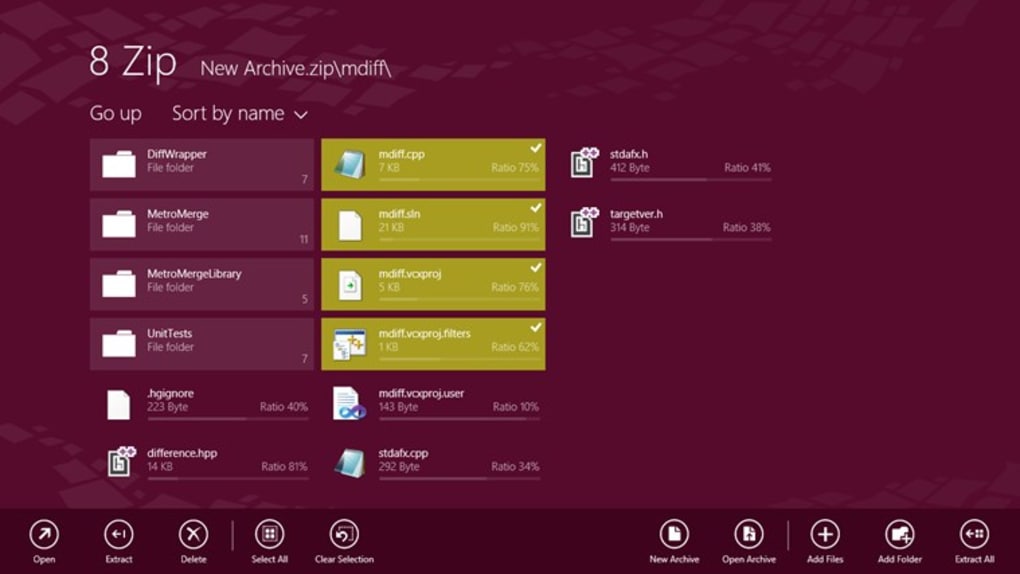
Once installed, 8 Zip integrates seamlessly into your operating system. Right-clicking on any ZIP or RAR file brings up a context menu with options to extract, view, or create new archives. You can also launch the app directly from the Start menu or desktop shortcut. The main interface is clean and user-friendly, with a ribbon-style toolbar that groups common actions—such as Create Archive, Extract, and Settings—within easy reach.
Using 8 Zip to decompress files is intuitive. Simply drag and drop a ZIP file into the application window, or use the “Open Archive” button. The app instantly displays the contents, allowing you to preview files before extraction. You can choose to extract all files at once or selectively pick specific items. For advanced users, the “Advanced Extraction” option lets you set custom paths, rename files during extraction, and apply encryption to the output.
Creating new archives is equally simple. Select the files or folders you want to compress, click “Create Archive,” choose your desired format (ZIP, 7Z, etc.), and set encryption if needed. The software automatically calculates compression ratios and provides real-time progress updates. Even large files—up to several gigabytes—are handled smoothly thanks to optimized memory usage and background processing.
Compatibility & System Requirements
One of the biggest strengths of 8 Zip is its broad compatibility across operating systems and devices. The software is officially supported on Windows 7, 8.1, 10, and Windows Server 2012 R2, ensuring it works on both legacy and modern systems. For Mac users, a dedicated version is available for macOS 10.12 and later, offering the same level of performance and feature parity as the Windows edition.
Mobile users aren’t left behind. The 8 Zip app is available for both Android and iOS, allowing you to manage compressed files directly from your smartphone or tablet. The mobile interface is touch-optimized, with swipe gestures for navigation and intuitive tap actions for file selection. Whether you're reviewing a ZIP file on a train or extracting a document at home, the mobile version ensures you’re never disconnected.
In terms of hardware, 8 Zip requires approximately 42.06 MB of free RAM and minimal disk space—around 50 MB for installation. This lightweight footprint means it runs efficiently even on older devices. The software is also compatible with emerging platforms like the HoloLens VR headset, showcasing its adaptability for future technologies.
For developers and IT administrators, 8 Zip offers command-line tools and API support, enabling automation and integration into larger workflows. This makes it a solid choice for enterprise environments where scalability and consistency are critical.
- Windows 7, 8.1, 10, Server 2012 R2
- macOS 10.12 and later
- Android 6.0 and above
- iOS 12 and above
- HoloLens VR support
- Lightweight (50 MB install, 42 MB RAM)
- Command-line interface for automation
Pros and Cons – A Balanced Review
Like any software, 8 Zip has its strengths and areas for improvement. Here’s a balanced look at what users love—and what could be better.
Pros:
- Free and secure with no ads or bundled malware
- Supports over 25 archive formats—unlike many basic ZIP tools
- Strong encryption with AES-256 for sensitive files
- Cross-platform sync with a single license
- Fast extraction even for large archives
- Cloud integration for direct file access
- Regular updates with new features and security patches
- Multi-language interface for global users
Cons:
- Advanced features locked behind a paid upgrade
- Mobile app lacks some desktop-level customization
- No built-in file sharing (requires third-party apps)
- Occasional UI lag on very old systems
- Limited support for password recovery if forgotten
FAQ – Your Questions Answered
Q: Is 8 Zip free to download and use? Yes, 8 Zip offers a fully functional free version that allows you to extract, create, and manage ZIP, RAR, 7Z, and other archive formats without any cost. The free version includes essential features like encryption, batch processing, and cloud integration.
Is 8 Zip free to download and use?
Q: Can I use 8 Zip on both Windows and Mac? Absolutely. 8 Zip is available for both Windows and macOS, and a single license allows you to install and use the app on both platforms. Your settings and archives are synchronized across devices.
Can I use 8 Zip on both Windows and Mac?
Q: Does 8 Zip support password-protected ZIP files? Yes, 8 Zip fully supports password-protected ZIP files. You can extract, create, and manage encrypted archives using strong AES-256 encryption for maximum security.
Does 8 Zip support password-protected ZIP files?
Q: Is there a mobile version of 8 Zip? Yes, 8 Zip is available for both Android and iOS devices. The mobile app supports all major archive formats and integrates with cloud storage for on-the-go file management.
Is there a mobile version of 8 Zip?
Q: How often is 8 Zip updated? The development team releases regular updates every 4–6 weeks to improve performance, fix bugs, and add new features. Security patches are prioritized and rolled out promptly.
How often is 8 Zip updated?
Conclusion: Why You Should Download 8 Zip Today
If you're searching for a free, secure, and powerful ZIP decompression tool that works across Windows, Mac, Android, and iOS, 8 Zip is an excellent choice. With its extensive format support, strong encryption, and seamless cross-device synchronization, it stands out in a crowded market of file compression utilities. Whether you're a student managing research files, a professional handling project archives, or a casual user downloading software, 8 Zip simplifies your workflow and enhances productivity.
Best of all, the free version offers full functionality—no watermarks, no trial limitations. With over three million downloads and a reputation for reliability, 8 Zip has proven itself as a trusted tool for millions worldwide. Now is the perfect time to download 8 Zip and experience fast, secure, and hassle-free file management on any device.
Download 8 Zip today and take control of your compressed files—effortlessly.







